Overview
Meko BYOC (bring your own cloud) runs the Meko data plane in your AWS account, on your Amazon EKS cluster. Your users sign in through your own identity provider. Meko operates a control plane, outside your account, that tells the environment what to run and receives its metrics.
Architecture
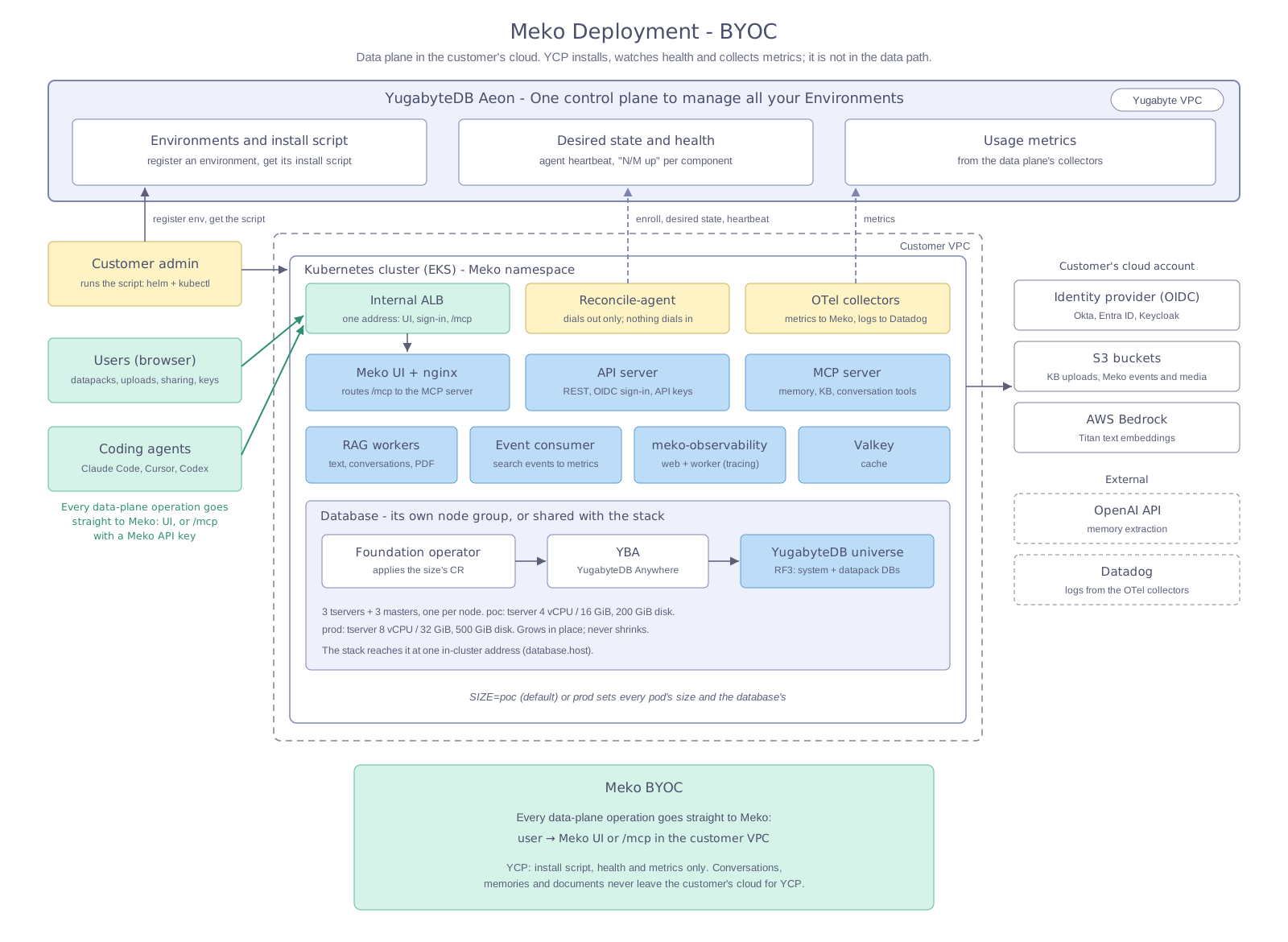
Everything in the customer VPC is yours. Meko never connects into your cluster: the control plane only answers calls that the reconcile agent makes. The outbound connections are listed in the network table.
What runs in your cluster
| Component | What it does |
|---|---|
| Web UI, API server, MCP server | The console, the REST API, and the MCP endpoint that agents connect to. All three are reached through the internal load balancer. |
| Knowledge-base workers | Index the documents users upload, calling Bedrock for embeddings. |
| Event consumer | Turns search events into the usage metrics the console shows. |
| Meko Observability | Traces and observability for agent activity. Langfuse fork that stores the Traces and Observations in the YugabyteDB Universe |
| YugabyteDB | The database for everything else, with replication factor 3. The YugabyteDB Kubernetes Operator creates it from a definition file you edit, and YugabyteDB Anywhere manages it. |
| Reconcile agent | Pulls the environment's desired state from the Meko control plane and applies it through the API server. It only makes outbound calls. |
| OpenTelemetry collectors | Send metrics to Meko and logs to Datadog. |
| Internal ALB | An Application Load Balancer that the AWS Load Balancer Controller creates for the UI, sign-in, and MCP traffic. It has no public address. |
AWS services Meko uses
| Service | Used for |
|---|---|
| Amazon S3 | Two buckets: the knowledge-base documents users upload, and Meko Observability data. |
| Amazon Bedrock | Titan Text Embeddings V1, for embedding memories, documents, and search queries. |
| Amazon EBS | The database's volumes. |
| Elastic Load Balancing | The internal ALB. |
| AWS Certificate Manager | The certificate for your DNS name, in production. |
What leaves your account
| Data | Goes to | Why |
|---|---|---|
| Metrics | Meko | Fleet health and usage for your environment |
| Logs | Datadog | Operating the environment |
| Conversation text | OpenAI | Memory extraction with gpt-5-mini |
| Reconcile-agent calls | Meko control plane | Reading desired state and reporting status |
Everything else stays in your account: the documents, the memories, the conversation history, the traces, and the database. Embeddings are computed by Bedrock in your own account and Region.
Who holds which credential
Meko reaches AWS with two sets of IAM access keys, each with the narrowest policy that works. The prerequisites give the policies.
| Principal | Used by | Permissions |
|---|---|---|
IAM user meko-byoc-bedrock |
API server, MCP server, knowledge-base workers | Invoke the Titan embedding model, and read and write the knowledge-base bucket |
IAM user meko-byoc-langfuse, or an IAM role for the Langfuse service account |
Meko Observability | Read and write the Langfuse bucket |
| The AWS identity of the person who runs the deployment | The install command | Read and set the CORS rule on the knowledge-base bucket |
| The AWS Load Balancer Controller's own role | The controller | Create the ALB. Meko needs no AWS credentials for this. |
Meko support gives you a license file. It holds the credentials that pull Meko's images and charts from Quay, and that ship metrics and logs, and you apply it to your cluster. The API key for the reconcile agent is shown once, when you register the environment in the console.
How sign-in works
Users sign in through your OpenID Connect (OIDC) identity provider, such as Okta, Keycloak, or Microsoft Entra ID. Meko has no accounts of its own. You create one OIDC client for Meko and one more user, which the reconcile agent signs in as to create its API key.
Proof of concept or production
The deployment has two sizes, set by one variable, SIZE. Pick one before you create the cluster, because it decides how big the nodes are.
poc |
prod |
|
|---|---|---|
| Use it for | Evaluation on a trusted network | Production |
| Database nodes | 3 × 8 vCPU / 32 GiB | 3 × 16 vCPU / 64 GiB |
| Stack nodes | 3 × 8 vCPU / 32 GiB | 3 × 16 vCPU / 64 GiB |
| Database disk per node | 200 GiB | 500 GiB |
| Address | The load balancer's own host name, over HTTP | Your DNS name, over HTTPS |
| Replicas | One of most components | Three of the API server, MCP server and Meko Observability, among others |
You can grow a proof-of-concept deployment into a production one later. You cannot shrink it. See Upgrade.
What you do
- Read the prerequisites and prepare AWS, your identity provider, OpenAI, and the cluster.
- Deploy Meko on AWS: run the install command that the Meko console generates for your environment.
- Upgrade by running the install command again for a newer release.
| You provide | Meko provides |
|---|---|
| An AWS account, with an EKS cluster in it | The Meko charts and container images on Quay |
| Two S3 buckets and two IAM users | A license file with the Quay, metrics and log credentials, which you apply to the cluster |
| An OpenAI API key | The install command for your environment |
| An OIDC identity provider | The reconcile agent's API key |
| DNS and an ACM certificate, for production |